
Changes to simple products and variations
How to change prices, stock, statuses and other product data through the chat.
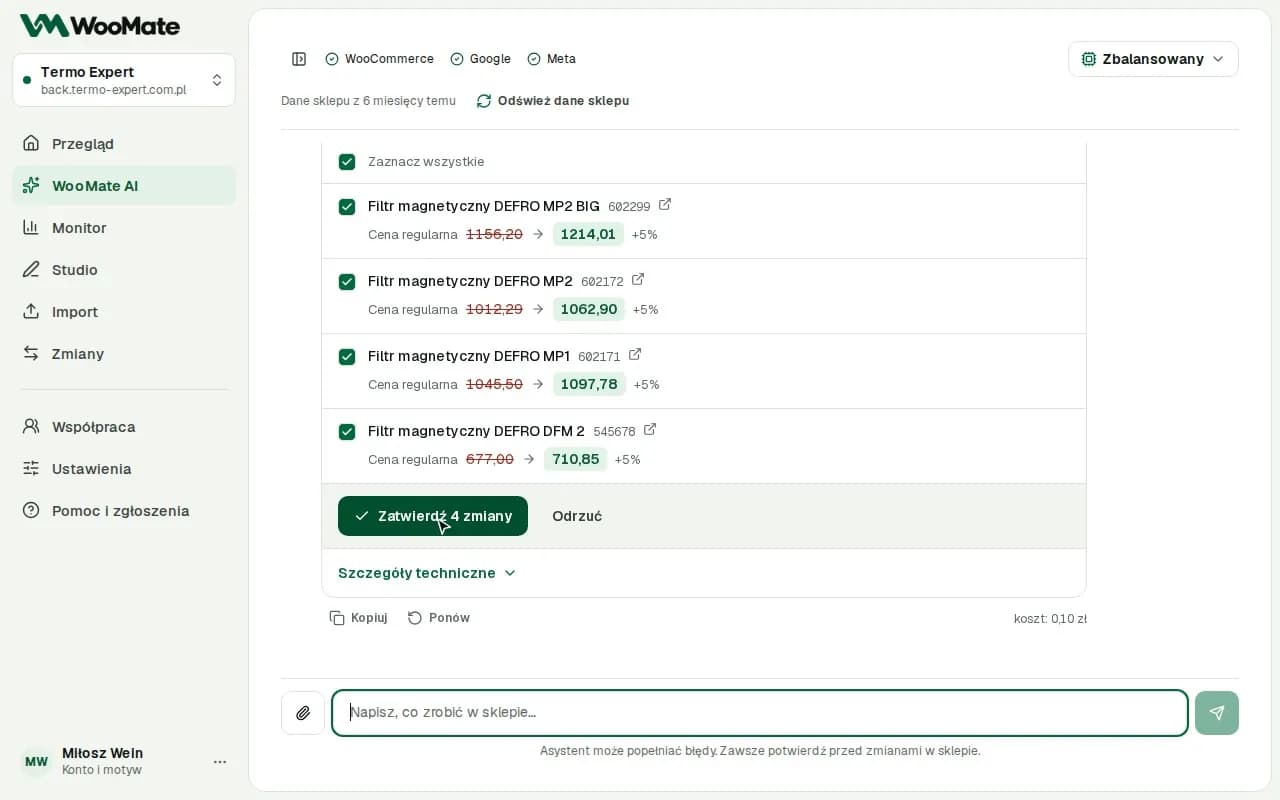
You ask for a change to one product or a whole group, review the values before and after, then approve the save.
What you need
A store with Full access. In Read only mode, WooMate doesn't edit products.
Change products
- Type, for example, "Set a sale price of $79 for SKU AB-12".
- Review the changes card: the fields, the Before and After values, and any warnings.
- Uncheck the items you don't want to save.
- Click Approve change (or Approve … changes) or Reject.
After saving, you'll see the message Saved in store: … of …, and the card shows an Undo button if the change can be undone.
Variable products
A variable product has no price of its own. Each variation has its own price, so WooMate fetches the variations first.
- Type, for example, "Raise the XL variations of the Basic T-shirt by $5".
- Check the rows on the card. Each one shows the product name and the variation option.
- Approve.
Simple products and variations from one request go on one card. For a variable product, availability changes separately for each variation.
New product
Click the Add a new product ready-made task or describe the product. By default, it's created as a simple product draft. The product won't go on sale unless you ask for it to be published.
Limitations
- One batch holds up to 100 products. Split a larger scope.
- Approval for a change expires after 30 minutes.
- If the data in your store changes after the preview, the save is stopped.
- Undo restores only the fields covered by the change.
Common problems
- The data changed since the preview. Ask the AI to prepare the change again.
- The products are variable products, so they have no price of their own. Point to the variations or ask the AI to fetch them.
- The preview is too large. Narrow the scope of the operation.
Related articles
Can't find the answer? Write to hello@getwoomate.com or request free onboarding help.